|
Component |
Oracle E-Business
Suite |
Oracle Fusion
Applications |
|
Database |
Oracle
Database 10G |
Oracle
Database 11G |
|
Application Server |
Oracle
Application server 10.1.2 |
Oracle
WebLogic |
|
User Interface |
Forms,
JSPs |
Oracle
ADF+ADF Java Server Pages |
|
Portal |
Oracle
Portal |
Oracle
Web Center |
|
Data Model |
Oracle
EBS Data Model |
Oracle
EBS Data Model + Siebel + PeopleSoft (Trees, Date Effectivity, Person Model) |
|
Attachments /
Imaging |
BLOBs |
Stellant |
|
Workflow /
Approval |
PL
/SQL |
BPEL |
|
Reports |
Reports
(11i), Discoverer |
BI
Publisher |
|
Analytics |
Discoverer |
OBIEE |
|
Financial
Reporting |
Financial Statement Generator |
Hyperion |
|
Integration |
AIA |
AIA
+BPEL + more web services |
|
XML Gateway |
XML Gateway |
BPEL
w/B2B Adapter |
Tuesday, May 11, 2021
Technology Difference between E-business Suite and Fusion Applications

Oracle Fusion Middleware Components
Below are the Oracle Fusion Middleware Components:
- Oracle WebLogic Server: Java application server that helps to deploy multiple applications in a robust and scalable environment.
- Oracle WebLogic Communication Services: provides click-to-dial functionality through contextual Actions which further helps users with information and actions.
- Oracle Identity Management: automatically manages user access and provides services and interfaces for third party application developments.
- Oracle Web Center: combines user interface technologies for building social applications.
- Oracle Business Intelligence: offers a complete to generates and delivers analyses for fusion application.
- Oracle SOA Suite: comprehensive software for building and deploying service-oriented architecture.
- Oracle Application Development Framework: a java framework to simplify application development by minimizing code writing
- Oracle JDeveloper: for building service-oriented applications using industry standards
Fusion Accounting Hub
- Oracle Fusion Accounting Hub (FAH) is a single source for managing all financial requirement as well as Reporting requirements against transaction and provides complete set of accounting tools and access to financial data.
- FAH receives data from multiple third party transactional system and also from the various Fusion Applications Products [ Sub ledgers ] and applies accounting rules to meet the regulatory reporting and business reporting requirements.
- Oracle Fusion Accounting Hub is integrated with Oracle Hyperion Financial Management (HFM) as the latter is a powerful consolidation solution to collect other non-financial information.
- Oracle acquired Hyperion and started using benefits of Hyperion for consolidation, allocation and reporting in Fusion.
- Hyperion has been leader in financial domain for years together.
- Fusion Accounting Hub (FAH) acts as integration platform for centralized accounting and its ability to generate multiple accounting representations (e.g., IFRS, local GAAP, industry, regulatory) for a single sub ledger transaction.
- FAH is a Next-Generation Financial Analysis for Centralized Reporting.
- Configurable accounting rules helps to capture transaction information used to create accounting.
- This feature of Fusion is highly configurable to satisfy capturing of transactions and to create different representation requirement for a company.
- Fusion Accounting Hub deals with transactional details and is intended for day-to-day operational reporting and analytics.
- Hyperion Financial Management (HFM) deals with period-end balances, not transactional details, and is generally not used as an intra-period reporting system.
Fusion Vs EBS R12.
- Date track in EBS is known as Data effectivity in Fusion
- Operating Unit in EBS is known as Business Unit.
- Major improvement is there is no need to create multiple COA. Single COA structure in fusion can handle multiple COA. this is the major improvement compare to R12.
- Reference Data to move configuration across business unit. This is Set ID. Application needs to be setup in Fusion with reference data before make it available transactions.
- Functional setup manager to move configuration across the instances.
- No more WebADI in Fusion. It is handled by ADFDI in Fusion. This fits with ADF architecture.
Approval Status of Lease in Oracle Property Manager
A lease can have either Draft or Final approval
status. The approval status of the lease determines what actions you can take
regarding two areas of the lease abstraction process: making changes to the
lease and generating payments and billings.
- Changes to the
Lease: If the lease is in draft status, you can modify, delete, or
add to the existing lease information. If the lease is in final status,
you cannot make changes to the lease unless you perform an edit or create
a lease amendment.
- Payment and Billing
Schedules: When you enter payment or billing terms in the Leases window
and change the lease approval status from Draft to Final, you initiate the
process that creates scheduled payments or scheduled billings.
Lease Statuses
The lease status describes the position of the lease in the lease life
cycle. Oracle Property Manager provides the following lease statuses:
- Active: Signifies
that the lease is within the agreed lease term.
- Holdover: Signifies
that the tenant retains possession of leased property after the lease
expires. The landlord, by accepting rent, agrees to the tenant's continued
occupancy.
- Lease Ordered: Signifies
that the landlord and tenant have committed to the general terms of a
lease. However, they have not finalized the lease because of certain open
issues. You can make or receive one time non-normalized payments, such as
security deposits.
- Month-to-Month: Signifies that
the tenant leases the property for one month at a time. You can create a
new lease in this status. However, this status is used most commonly when
a lease expires and the landlord and tenant have not finalized a new
agreement to continue the tenancy.
- Signed: Signifies that
the landlord and tenant have signed the lease. However, certain pending
issues may prevent you from finalizing the lease. As in the case of the
Lease Ordered status, you can make or receive one-time non-normalized rent
payments.
- Terminated: Signifies that
the lease agreement has ended.
Using the Lease Ordered and Signed Lease Statuses
- Use the Lease
Ordered (LOF) and Signed (SGN) lease statuses to schedule payments or
billings and transfer transactions to Oracle Payables or Oracle
Receivables before you finalize the lease. To finalize the lease, you must
also change the Approval Status of the lease.
- When you save a lease with a
status of LOF or SGN, Oracle Property Manager creates schedules and items
for all one-time non-normalized terms.
- Accounting
guidelines state that you cannot normalize payment or billing terms until
you finalize a lease. Accordingly, Oracle Property Manager does not
normalize terms while a lease is in SGN or LOF lease status.
- Oracle
Property Manager runs the Schedules and Items concurrent program each time
you create one-time payment or billing terms. After you save your work,
the limitations for modifying terms in a finalized lease apply to
modifying these one-time lease terms.
- In other respects, the lease
functions as a draft lease. Therefore, you can freely edit other lease
attributes, including the lease commencement date and the attributes of
the other lease terms.
- If you change the lease
commencement date, Oracle Property Manager does not automatically change
the dates for any of the lease terms.
Is it possible in Oracle Property Manager to record Rent Prepayments for Payments and Billings (AP/AR) without finalize the lease?
- “Yes” this is possible in R12 Oracle Property Manager for both Expense and Revenue Leases.
- Below process will assist you in using the prepayments Rent/Billing functionality in Oracle Release R12. It will take you through the process of creating prepayments for expense leases and testing purposes.
How to create Prepayment Invoice through Oracle Property Manager before finalize the lease
Prerequisites:
- Lease status should be Lease Ordered (LOF) or Signed (SGN)
- Frequency should be “One Time”
- Billing/Payment terms should be “Non-Normalized”
Go
to Property Manager Responsibility.
Leases and Documents à Main Lease à Enter Leases and Documents.
Step1: Enter Lease

Click on “New” button.
Enter required details for lease creation
as shown in below screen shot.

- Make sure lease status should be “Lease Ordered” or “Signed”
- This is mandatory for prepayment creation otherwise system will not create the prepayment schedule and items.
Step 2: Enter Lease Details

Step 3: Enter Location Information

Step 4: Enter Payment Details
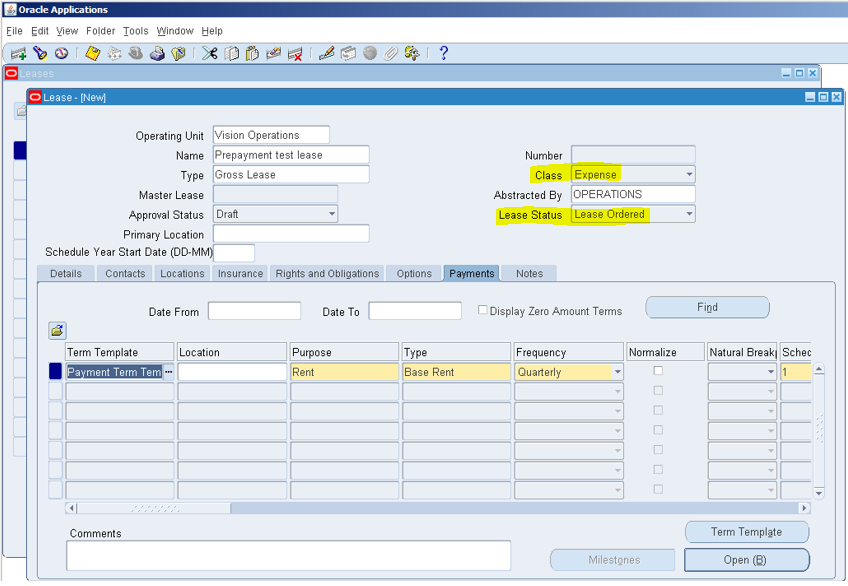
Step 5: Enter Prepayment Term (Line):
Here you can attach Prepayment Template if you created otherwise enter prepayment line manually.
- Payment term type should be “Prepayment”, if you want to select “Deposit” or other system will create schedule for that line also but that line should be no-normalized with once time frequency.
- Target date is mandatory for "prepayment" line but this date should not be before or after lease key dates as soon as you save the lease property manager will creates schedules & items for all onetime non-normalized terms.

Save the lease. System will popups small window as shown below in screen shot click “Yes”

After clicking on “Yes” button system will generate schedules and items for prepayment line.
Click “OK” button and
check the output.

Step 6: View the Schedules and Item Output Report
ViewàRequestsàFind and see Prepayment schedules & items output report.
- Further you can check the accounting and invoice so do “authorization” and export this schedule to AP and then import in AP through “Oracle Payables Interfaces”.
- Once contract signed and date are confirmed then retrieve the lease and change the status from (Lease Ordered/Signed) to “ACTIVE” and approval status as “Final” Oracle Property Manager runs the Schedules and Items concurrent program and creates billing/payment schedules based on given frequency.
Monday, May 10, 2021
Query to get GL Balances
SELECT bal.code_combination_id code_combination_id
,segment1 fund
,segment2 org
,segment3 project
,segment4 account
,segment5 location
,DECODE( account_type, 'A','Asset'
,'C','Budgetary (CR)'
,'D','Budgetary (DR)'
,'E','Expense'
,'L','Liability'
,'O','Owners equity'
,'R','Revenue'
,account_type) account_type
,period_name period_abbr
,LAST_DAY( TO_DATE( period_name, 'MON-RR')) period_date
,DECODE( account_type, 'R', -1,
DECODE( segment4, '1000', -1,
DECODE( segment4, '2000', -1,
DECODE( segment4, '3000', -1,
DECODE( segment4, '4000', -1,
+1))))) xyz
,SUM( DECODE( actual_flag, 'B',
NVL( period_net_dr, 0) - NVL( period_net_cr, 0),
0)) period_net_budget_bal
,SUM( DECODE( actual_flag, 'A',
NVL( period_net_dr, 0) - NVL( period_net_cr, 0),
0)) PERIOD_NET_ACTUAL_BALANCE
,SUM( DECODE( actual_flag, 'E', DECODE( encumbrance_type, 'Invoice',
NVL( period_net_dr, 0) - NVL( period_net_cr, 0),
0), 0)) period_net_invoice_encumb
,SUM( DECODE( actual_flag, 'A',
NVL( begin_balance_dr, 0) + NVL( period_net_dr, 0)
- NVL( begin_balance_cr, 0) - NVL( period_net_cr, 0),
0)) current_gl_balance
,SUM( DECODE( actual_flag, 'E', DECODE( encumbrance_type, 'Invoice',
nvl( begin_balance_dr, 0) + nvl( period_net_dr, 0)
- nvl( begin_balance_cr, 0) - nvl( period_net_cr, 0),
0), 0)) invoice_encumbrance
,period_year
FROM gl_balances bal
,gl_encumbrance_types get
,gl_code_combinations gcc
WHERE bal.encumbrance_type_id = get.encumbrance_type_id(+)
AND bal.code_combination_id = gcc.code_combination_id
GROUP BY bal.code_combination_id
,segment1
,segment2
,segment3
,segment4
,segment5
,account_type
,period_name
,period_year
;
Sunday, May 9, 2021
Query to get Termination Details in Oracle HRMS
SELECT papf.person_number
,ppnf.full_name
,to_char(ppos.actual_termination_date, 'dd-mon-yyyy','NLS_DATE_LANGUAGE=ENGLISH') termination_date
,part.action_reason termination_reason
FROM per_all_people_f papf
,per_person_names_f ppnf
,per_periods_of_service_v ppos
,per_action_reasons_tl part
,per_action_occurrences pao
WHERE papf.person_id =ppnf.person_id
AND papf.person_id =ppos.person_id
AND UPPER(ppnf.name_type)='GLOBAL'
AND TO_CHAR(ppos.actual_termination_date,'dd-mm-yyyy')<TO_CHAR(SYSDATE,'dd-mm-yyyy')
AND ppos.action_occurrence_id = pao.action_occurrence_id
AND pao.action_reason_id = part.action_reason_id
AND part.language = USERENV('LANG')
AND TRUNC(SYSDATE) BETWEEN TRUNC(papf.effective_start_date) AND TRUNC(papf.effective_end_date)
AND TRUNC(SYSDATE) BETWEEN TRUNC(ppnf.effective_start_date) AND TRUNC(ppnf.effective_end_date)
Friday, May 7, 2021
12.2.5 Features in Oracle Cash Management
- CAMT.053 - Bank to Customer Statement Support
- The CAMT.053 Bank to Customer Statement messaging is used to inform account owners of the entries booked in their bank account and to provide account owners with balance information.
- Additionally, the CAMT.053 Bank to customer Statement provides reporting of the post settlement returns and reversals of the direct debit transactions.
- Oracle Cash Management contains the following features for supporting the use of CAMT.053 Bank to Customer Statement messaging:
- Loading and processing of the CAMT.053 bank statement format
- Matching and automatic reconciliation of SEPA direct debit transactions Oracle E-Business Suite Releases 12.1 and 12.2 Release Content Document Oracle Credit Management 10
- Automatic reconciliation of bank statements with direct debit reversals and returns.
12.2.9 Functional Changes in Oracle Property Manager
- Compliance changes as per IFRS 16 and ASC 842 (US GAAP)
- Account for Right of Use (ROU) and Lease liability
- Manage amendments
- Manage options
- Period end accrual accounting
- Upload balances on transition date
- Calculation of gain and loss
12.2.9 Features in Oracle Property Manager
Improve Flexibility for Transaction Processing:
- Customers need to create the right-of-use assets (ROU) and lease liability on the balance sheet when the contract is created and ensure the balances are removed when the contract is terminated to ensure adherence to IFRS 16 and ASC 842.
- Support for multiple amendments within the same period.
- Categorizing amendments by the type of change (ex: rate change, reclassification, term change, etc.).
- Amendments for re-classification, rate change, contractions, and extensions using the same amount for the ROU and Lease Liability, which is in line with IFRS 16 and ASC 842. Oracle E-Business Suite Releases 12.1 and 12.2 Release Content Document Oracle Property Manager 93
- ROU and lease liability balances are carried forward from previous terms by linking the new terms added during an amendment.
- All the details of the amendment are captured in an audit table to provide visibility and transparency of contract changes and their financial impact.
Additions to Disclosure Reports
Amortization Improvements:
- A new interest calculation method has been added. The new method of Daily Compounding Interest has been added to both daily and periodical amortizations.
Equipment Enhancements:
- New functionality has been added to improve the operational efficiency of handling equipment leases. This includes:
- Attachments: Similar to the property solution, attachments are now supported for equipment. This allows users to capture documents related to the contract, such as copies of the contract, schedules, asset information, etc.
- Workflow: Also in line with the property solution, an approval workflow is initiated when activating a lease contract.
- Asset Auto-Numbers: A lease can have many assets included. As assets are created on the contract, they can be automatically numbered to save time during contract creation.
View Leasing related Accounts Payable Transactions: Users are able to view Accounts Payable invoices initiated by Property Manager from the view transactions options in Property Manager.
The Oracle Lease Contracts Command Center feature is available at no additional cost to licensed users of Oracle Financials or Oracle Property Manager. It can be applied to Release 12.2.4 and above.
Lease Contracts Dashboard functionality requires Oracle Enterprise Command Center Framework Release 12.2 V4.
12.2.8 Features in Oracle Property Manager
- Support for ASC 842 and IFRS 16 for Property and Equipment
12.2.4 Features in Oracle Property Manager
- 12.2.4 release provides a new integration which brings the organizational hierarchy defined in Oracle Property Manager into Oracle Environmental Accounting & Reporting.
- Data entities for Region, Property, Building, Floor, and Office are imported from Oracle Property Manager along with their implicit hierarchy to create a new default hierarchy in the Environmental Accounting & Reporting module.
- This hierarchy is called the "GHG Property Manager Organization Hierarchy".
12.1.3+ Features in Oracle Property Manager
- Lease and Terms APIs programmatically convert legacy system leases and update existing leases details and payment terms into Oracle Property Manager.
- Variable Rent and Breakpoint APIs
- Index Rent APIs
12.2.9 Features in Oracle Assets
- Export Functionality
- DFF support
Note: Above Functionalities requires Oracle Enterprise Command Center Framework (ECC) Release 12.2 V4.
12.2.8+ Features in Oracle Assets
- Enhancements to Asset Reconciliation Dashboard
- Enhancement to Asset Cost Dashboard
- Enhancement to Asset Location Dashboard
- Grouping of Attributes in Attribute Groups
12.2.8 Features in Oracle Assets
- New Depreciation and Amortization BI Publisher Report to Support Form 4562 Filing to US IRS
- Oracle Assets Command Center:
- Asset Reconciliation Dashboard
- Asset Cost Dashboard
- Asset Aging Dashboard
- Asset Location Dashboard
- Mass Transactions Dashboard
- Additions Pipeline Dashboard
12.2.9 Functional Impact of Projects Costing
Transaction fund check for bottom up integration enabled projects
- Asset
line generation using capital events
- Transaction exception details
- Borrowed and lent amounts processing when override schedule exists for costing and invoice/revenue
- Invoice workbench
- Contingent worker time entry
- Revenue distributed flag maintenance for capital projects
- IPV transactions for inventory based PO
- Capitalization workbench
- Project Capitalization Summary
12.2.9 features in Oracle Projects Costing
- Asset lines generation when capital event name more than 30 characters: The concurrent program ‘PRC: Generate Asset Lines for a Single Project’ would now generate asset lines successfully when capital event name is more than 30 characters.
- Transaction exception details report to display full task name when task name contains more than 15 characters
- Borrowed and lent process to process amounts correctly when burden schedule overrides exist
- Transaction currency derivation for contingent worker time cards
Revenue Distribution Flag for Capital Projects: When burden multiplier is modified for a capital project that uses enhanced burdening and capitalization on burden cost setup, the revenue distribution flag would not be updated on expenditure items.
- New Transaction Source introduced to handle Invoice Price Variance (IPV) for inventory based PO : New transaction source ‘PJM_CSTBP_WIP_GL_ACCOUNTS’ has been introduced to interface IPV lines for inventory based PO, directly from Oracle Inventory to Oracle Projects.
- Expenditures with Unit of Measure (UOM) as currency in Asset Line Details form : The Asset Line Details form would now show all the asset lines details, if the asset line generated from the expenditure item has currency as UOM.
- Supplier Invoices with Closed Projects Status: User would now be able to query the project related supplier invoices in Invoice Workbench form even though the project not in active status.
- Budgeted Cost in Task Summary UI: Budgeted cost amount would now show correct amount for the task even though no actual cost exists for that task.
12.2.9 Features in Oracle Payables
Export Functionality:
- You can export results table data to a csv file across all dashboards.
Descriptive Flex field Support:
- Display of Descriptive Flexfield (DFF) attributes in Enterprise Command Center dashboards, which allow search and filter by DFF attributes,
Period Close Dashboard:
- The Period Close dashboard provides real-time visibility into the accounting process in helping you identify any potential bottlenecks early in the closing cycle by focusing on the unprocessed accounting events, accounting errors, and untransformed journals to General Ledger.
- The dashboard helps the accounts receivable manager to reduce period close time, accelerate delivery of financial results to internal management, and identify improvements to be made over the next period.
Note: Above functionalities requires Oracle Enterprise Command Center Framework (ECC) Release 12.2 V4.
12.2.4 features in Oracle Payables
Parallel Approval of Supplier Invoices:
- Significantly improve invoice approval processing efficiency with Parallel Approval of Supplier Invoices.
- Parallel approval for invoice header level approvals, enables faster approval cycles by allowing all identified approvers to receive approval notifications simultaneously upon invoice submission.
- Parallel approval reduces overall approval processing time by enabling all approvers to have immediate visibility to action invoices requiring approval.
Wednesday, February 19, 2020
API to Delete Descriptive Flex Field Context in Oracle APPS
--------------------------------------------------------------------------------
--API to delete Descriptive Flex Field Context
--------------------------------------------------------------------------------
DECLARE
CURSOR c1
IS
SELECT dff.application_id
,dff.descriptive_flexfield_name
,dff_context.descriptive_flex_context_code
FROM fnd_descriptive_flexs_vl dff
,fnd_descr_flex_contexts_vl dff_context
WHERE title = 'Requisition Headers'
AND dff.descriptive_flexfield_name = dff_context.descriptive_flexfield_name
AND dff_context.descriptive_flex_context_code IN ('Test','Req Operating Enable')
;
BEGIN
FOR i IN c1
LOOP
BEGIN
fnd_descr_flex_contexts_pkg.delete_row(x_application_id => i.application_id
,x_descriptive_flexfield_name => i.descriptive_flexfield_name
,x_descriptive_flex_context_cod => i.descriptive_flex_context_code
);
EXCEPTION
WHEN OTHERS THEN
dbms_output.put_line('Error occured while deleting DFF Context. Error Message: '||SQLERRM);
END;
dbms_output.put_line('DFF Conetext Filed: '||i.descriptive_flex_context_code ||' deleted successfully');
END LOOP;
END;
--
--Run below query to validate deletion successfully or not
/*SELECT dff.application_id
,dff.descriptive_flexfield_name
,dff_context.descriptive_flex_context_code
FROM fnd_descriptive_flexs_vl dff
,fnd_descr_flex_contexts_vl dff_context
WHERE title = 'Requisition Headers'
AND dff.descriptive_flexfield_name = dff_context.descriptive_flexfield_name
AND dff_context.descriptive_flex_context_code IN ('Test','Req Operating Enable')
;
*/
-- Issue commit
--API to delete Descriptive Flex Field Context
--------------------------------------------------------------------------------
DECLARE
CURSOR c1
IS
SELECT dff.application_id
,dff.descriptive_flexfield_name
,dff_context.descriptive_flex_context_code
FROM fnd_descriptive_flexs_vl dff
,fnd_descr_flex_contexts_vl dff_context
WHERE title = 'Requisition Headers'
AND dff.descriptive_flexfield_name = dff_context.descriptive_flexfield_name
AND dff_context.descriptive_flex_context_code IN ('Test','Req Operating Enable')
;
BEGIN
FOR i IN c1
LOOP
BEGIN
fnd_descr_flex_contexts_pkg.delete_row(x_application_id => i.application_id
,x_descriptive_flexfield_name => i.descriptive_flexfield_name
,x_descriptive_flex_context_cod => i.descriptive_flex_context_code
);
EXCEPTION
WHEN OTHERS THEN
dbms_output.put_line('Error occured while deleting DFF Context. Error Message: '||SQLERRM);
END;
dbms_output.put_line('DFF Conetext Filed: '||i.descriptive_flex_context_code ||' deleted successfully');
END LOOP;
END;
--
--Run below query to validate deletion successfully or not
/*SELECT dff.application_id
,dff.descriptive_flexfield_name
,dff_context.descriptive_flex_context_code
FROM fnd_descriptive_flexs_vl dff
,fnd_descr_flex_contexts_vl dff_context
WHERE title = 'Requisition Headers'
AND dff.descriptive_flexfield_name = dff_context.descriptive_flexfield_name
AND dff_context.descriptive_flex_context_code IN ('Test','Req Operating Enable')
;
*/
-- Issue commit
API to create Sales Order Quote in Oracle APPS
To import Quote in Order Management we can use OE_ORDER_PUB.process_order API by setting TRANSACTION_PHASE_CODE to "N".
Below is the sample code:
set serveroutput on
DECLARE
l_header_rec OE_ORDER_PUB.Header_Rec_Type;
l_x_header_rec OE_ORDER_PUB.Header_Rec_Type;
l_line_tbl OE_ORDER_PUB.Line_Tbl_Type;
l_x_line_tbl OE_ORDER_PUB.Line_Tbl_Type;
l_action_request_tbl OE_ORDER_PUB.Request_Tbl_Type;
l_x_action_request_tbl OE_ORDER_PUB.Request_Tbl_Type;
l_header_adj_tbl OE_ORDER_PUB.Header_Adj_Tbl_Type;
l_line_adj_tbl OE_ORDER_PUB.line_adj_tbl_Type;
l_header_scr_tbl OE_ORDER_PUB.Header_Scredit_Tbl_Type;
l_line_scredit_tbl OE_ORDER_PUB.Line_Scredit_Tbl_Type;
l_request_rec OE_ORDER_PUB.Request_Rec_Type ;
l_return_status VARCHAR2(1000);
l_msg_count NUMBER;
l_msg_data VARCHAR2(1000);
p_api_version_number NUMBER :=1.0;
p_init_msg_list VARCHAR2(10) := FND_API.G_FALSE;
p_return_values VARCHAR2(10) := FND_API.G_FALSE;
p_action_commit VARCHAR2(10) := FND_API.G_FALSE;
x_return_status VARCHAR2(1);
x_msg_count NUMBER;
x_msg_data VARCHAR2(100);
p_header_rec OE_ORDER_PUB.Header_Rec_Type := OE_ORDER_PUB.G_MISS_HEADER_REC;
p_old_header_rec OE_ORDER_PUB.Header_Rec_Type := OE_ORDER_PUB.G_MISS_HEADER_REC;
p_header_val_rec OE_ORDER_PUB.Header_Val_Rec_Type := OE_ORDER_PUB.G_MISS_HEADER_VAL_REC;
p_old_header_val_rec OE_ORDER_PUB.Header_Val_Rec_Type := OE_ORDER_PUB.G_MISS_HEADER_VAL_REC;
p_Header_Adj_tbl OE_ORDER_PUB.Header_Adj_Tbl_Type := OE_ORDER_PUB.G_MISS_HEADER_ADJ_TBL;
p_old_Header_Adj_tbl OE_ORDER_PUB.Header_Adj_Tbl_Type := OE_ORDER_PUB.G_MISS_HEADER_ADJ_TBL;
p_Header_Adj_val_tbl OE_ORDER_PUB.Header_Adj_Val_Tbl_Type := OE_ORDER_PUB.G_MISS_HEADER_ADJ_VAL_TBL;
p_old_Header_Adj_val_tbl OE_ORDER_PUB.Header_Adj_Val_Tbl_Type := OE_ORDER_PUB.G_MISS_HEADER_ADJ_VAL_TBL;
p_Header_price_Att_tbl OE_ORDER_PUB.Header_Price_Att_Tbl_Type := OE_ORDER_PUB.G_MISS_HEADER_PRICE_ATT_TBL;
p_old_Header_Price_Att_tbl OE_ORDER_PUB.Header_Price_Att_Tbl_Type := OE_ORDER_PUB.G_MISS_HEADER_PRICE_ATT_TBL;
p_Header_Adj_Att_tbl OE_ORDER_PUB.Header_Adj_Att_Tbl_Type := OE_ORDER_PUB.G_MISS_HEADER_ADJ_ATT_TBL;
p_old_Header_Adj_Att_tbl OE_ORDER_PUB.Header_Adj_Att_Tbl_Type := OE_ORDER_PUB.G_MISS_HEADER_ADJ_ATT_TBL;
p_Header_Adj_Assoc_tbl OE_ORDER_PUB.Header_Adj_Assoc_Tbl_Type := OE_ORDER_PUB.G_MISS_HEADER_ADJ_ASSOC_TBL;
p_old_Header_Adj_Assoc_tbl OE_ORDER_PUB.Header_Adj_Assoc_Tbl_Type := OE_ORDER_PUB.G_MISS_HEADER_ADJ_ASSOC_TBL;
p_Header_Scredit_tbl OE_ORDER_PUB.Header_Scredit_Tbl_Type := OE_ORDER_PUB.G_MISS_HEADER_SCREDIT_TBL;
p_old_Header_Scredit_tbl OE_ORDER_PUB.Header_Scredit_Tbl_Type := OE_ORDER_PUB.G_MISS_HEADER_SCREDIT_TBL;
p_Header_Scredit_val_tbl OE_ORDER_PUB.Header_Scredit_Val_Tbl_Type := OE_ORDER_PUB.G_MISS_HEADER_SCREDIT_VAL_TBL;
p_old_Header_Scredit_val_tbl OE_ORDER_PUB.Header_Scredit_Val_Tbl_Type := OE_ORDER_PUB.G_MISS_HEADER_SCREDIT_VAL_TBL;
p_line_tbl OE_ORDER_PUB.Line_Tbl_Type := OE_ORDER_PUB.G_MISS_LINE_TBL;
p_old_line_tbl OE_ORDER_PUB.Line_Tbl_Type := OE_ORDER_PUB.G_MISS_LINE_TBL;
p_line_val_tbl OE_ORDER_PUB.Line_Val_Tbl_Type := OE_ORDER_PUB.G_MISS_LINE_VAL_TBL;
p_old_line_val_tbl OE_ORDER_PUB.Line_Val_Tbl_Type := OE_ORDER_PUB.G_MISS_LINE_VAL_TBL;
p_Line_Adj_tbl OE_ORDER_PUB.Line_Adj_Tbl_Type := OE_ORDER_PUB.G_MISS_LINE_ADJ_TBL;
p_old_Line_Adj_tbl OE_ORDER_PUB.Line_Adj_Tbl_Type := OE_ORDER_PUB.G_MISS_LINE_ADJ_TBL;
p_Line_Adj_val_tbl OE_ORDER_PUB.Line_Adj_Val_Tbl_Type := OE_ORDER_PUB.G_MISS_LINE_ADJ_VAL_TBL;
p_old_Line_Adj_val_tbl OE_ORDER_PUB.Line_Adj_Val_Tbl_Type := OE_ORDER_PUB.G_MISS_LINE_ADJ_VAL_TBL;
p_Line_price_Att_tbl OE_ORDER_PUB.Line_Price_Att_Tbl_Type := OE_ORDER_PUB.G_MISS_LINE_PRICE_ATT_TBL;
p_old_Line_Price_Att_tbl OE_ORDER_PUB.Line_Price_Att_Tbl_Type := OE_ORDER_PUB.G_MISS_LINE_PRICE_ATT_TBL;
p_Line_Adj_Att_tbl OE_ORDER_PUB.Line_Adj_Att_Tbl_Type := OE_ORDER_PUB.G_MISS_LINE_ADJ_ATT_TBL;
p_old_Line_Adj_Att_tbl OE_ORDER_PUB.Line_Adj_Att_Tbl_Type := OE_ORDER_PUB.G_MISS_LINE_ADJ_ATT_TBL;
p_Line_Adj_Assoc_tbl OE_ORDER_PUB.Line_Adj_Assoc_Tbl_Type := OE_ORDER_PUB.G_MISS_LINE_ADJ_ASSOC_TBL;
p_old_Line_Adj_Assoc_tbl OE_ORDER_PUB.Line_Adj_Assoc_Tbl_Type := OE_ORDER_PUB.G_MISS_LINE_ADJ_ASSOC_TBL;
p_Line_Scredit_tbl OE_ORDER_PUB.Line_Scredit_Tbl_Type := OE_ORDER_PUB.G_MISS_LINE_SCREDIT_TBL;
p_old_Line_Scredit_tbl OE_ORDER_PUB.Line_Scredit_Tbl_Type := OE_ORDER_PUB.G_MISS_LINE_SCREDIT_TBL;
p_Line_Scredit_val_tbl OE_ORDER_PUB.Line_Scredit_Val_Tbl_Type := OE_ORDER_PUB.G_MISS_LINE_SCREDIT_VAL_TBL;
p_old_Line_Scredit_val_tbl OE_ORDER_PUB.Line_Scredit_Val_Tbl_Type := OE_ORDER_PUB.G_MISS_LINE_SCREDIT_VAL_TBL;
p_Lot_Serial_tbl OE_ORDER_PUB.Lot_Serial_Tbl_Type := OE_ORDER_PUB.G_MISS_LOT_SERIAL_TBL;
p_old_Lot_Serial_tbl OE_ORDER_PUB.Lot_Serial_Tbl_Type := OE_ORDER_PUB.G_MISS_LOT_SERIAL_TBL;
p_Lot_Serial_val_tbl OE_ORDER_PUB.Lot_Serial_Val_Tbl_Type := OE_ORDER_PUB.G_MISS_LOT_SERIAL_VAL_TBL;
p_old_Lot_Serial_val_tbl OE_ORDER_PUB.Lot_Serial_Val_Tbl_Type := OE_ORDER_PUB.G_MISS_LOT_SERIAL_VAL_TBL;
p_action_request_tbl OE_ORDER_PUB.Request_Tbl_Type := OE_ORDER_PUB.G_MISS_REQUEST_TBL;
x_header_val_rec OE_ORDER_PUB.Header_Val_Rec_Type;
x_Header_Adj_tbl OE_ORDER_PUB.Header_Adj_Tbl_Type;
x_Header_Adj_val_tbl OE_ORDER_PUB.Header_Adj_Val_Tbl_Type;
x_Header_price_Att_tbl OE_ORDER_PUB.Header_Price_Att_Tbl_Type;
x_Header_Adj_Att_tbl OE_ORDER_PUB.Header_Adj_Att_Tbl_Type;
x_Header_Adj_Assoc_tbl OE_ORDER_PUB.Header_Adj_Assoc_Tbl_Type;
x_Header_Scredit_tbl OE_ORDER_PUB.Header_Scredit_Tbl_Type;
x_Header_Scredit_val_tbl OE_ORDER_PUB.Header_Scredit_Val_Tbl_Type;
x_line_val_tbl OE_ORDER_PUB.Line_Val_Tbl_Type;
x_Line_Adj_tbl OE_ORDER_PUB.Line_Adj_Tbl_Type;
x_Line_Adj_val_tbl OE_ORDER_PUB.Line_Adj_Val_Tbl_Type;
x_Line_price_Att_tbl OE_ORDER_PUB.Line_Price_Att_Tbl_Type;
x_Line_Adj_Att_tbl OE_ORDER_PUB.Line_Adj_Att_Tbl_Type;
x_Line_Adj_Assoc_tbl OE_ORDER_PUB.Line_Adj_Assoc_Tbl_Type;
x_Line_Scredit_tbl OE_ORDER_PUB.Line_Scredit_Tbl_Type;
x_Line_Scredit_val_tbl OE_ORDER_PUB.Line_Scredit_Val_Tbl_Type;
x_Lot_Serial_tbl OE_ORDER_PUB.Lot_Serial_Tbl_Type;
x_Lot_Serial_val_tbl OE_ORDER_PUB.Lot_Serial_Val_Tbl_Type;
x_action_request_tbl OE_ORDER_PUB.Request_Tbl_Type;
X_DEBUG_FILE VARCHAR2(2000);
l_line_tbl_index NUMBER;
l_msg_index_out NUMBER(10);
BEGIN
dbms_output.enable(1000000);
fnd_global.apps_initialize(0,21623,660); -- 1318 pass in user_id, responsibility_id, and application_id
MO_GLOBAL.INIT('ONT');
MO_GLOBAL.SET_POLICY_CONTEXT('S', 204);
oe_debug_pub.debug_on;
oe_debug_pub.initialize;
X_DEBUG_FILE := OE_DEBUG_PUB.Set_Debug_Mode('FILE');
oe_Debug_pub.setdebuglevel(5);
dbms_output.put_line('File : '||X_DEBUG_FILE);
dbms_output.put_line('START OF NEW DEBUG');
--This is to CREATE an order header and an order line
--Create Header record
--Initialize header record to missing
l_header_rec := OE_ORDER_PUB.G_MISS_HEADER_REC;
l_header_rec.TRANSACTIONAL_CURR_CODE := 'USD';
l_header_rec.pricing_date := SYSDATE;
l_header_rec.cust_po_number := 'TestQuote1';
l_header_rec.sold_to_org_id := 1005;
l_header_rec.price_list_id := 1000;
l_header_rec.ordered_date := SYSDATE;
l_header_rec.shipping_method_code := 'DHL';
l_header_rec.sold_from_org_id := 204;
l_header_rec.salesrep_id := -3;
l_header_rec.order_type_id := 1000;
l_header_rec.transaction_phase_code := 'N';
l_header_rec.operation := OE_GLOBALS.G_OPR_CREATE;
l_line_tbl_index :=1;
-- FIRST LINE RECORD
-- Initialize record to missing
l_line_tbl(l_line_tbl_index) := OE_ORDER_PUB.G_MISS_LINE_REC;
-- Line attributes
l_line_tbl(l_line_tbl_index).inventory_item_id := 149;
l_line_tbl(l_line_tbl_index).ordered_quantity := 5;
l_line_tbl(l_line_tbl_index).ship_from_org_id := 207;
l_line_tbl(l_line_tbl_index).subinventory := 'FGI';
l_line_tbl(l_line_tbl_index).operation := OE_GLOBALS.G_OPR_CREATE;
-- CALL TO PROCESS ORDER Check the return status and then commit.
--"TRANSACTION_PHASE_CODE"should be set to "N" while using Process Order API to import quote.
OE_ORDER_PUB.process_order(p_api_version_number => 1.0
,p_init_msg_list => fnd_api.g_false
,p_return_values => fnd_api.g_false
,p_action_commit => fnd_api.g_false
,x_return_status => l_return_status
,x_msg_count => l_msg_count
,x_msg_data => l_msg_data
,p_header_rec => l_header_rec
,p_line_tbl => l_line_tbl
,p_action_request_tbl => l_action_request_tbl
-- OUT PARAMETERS
,x_header_rec => l_x_header_rec
,x_header_val_rec => x_header_val_rec
,x_Header_Adj_tbl => x_Header_Adj_tbl
,x_Header_Adj_val_tbl => x_Header_Adj_val_tbl
,x_Header_price_Att_tbl => x_Header_price_Att_tbl
,x_Header_Adj_Att_tbl => x_Header_Adj_Att_tbl
,x_Header_Adj_Assoc_tbl => x_Header_Adj_Assoc_tbl
,x_Header_Scredit_tbl => x_Header_Scredit_tbl
,x_Header_Scredit_val_tbl => x_Header_Scredit_val_tbl
,x_line_tbl => l_x_line_tbl
,x_line_val_tbl => x_line_val_tbl
,x_Line_Adj_tbl => x_Line_Adj_tbl
,x_Line_Adj_val_tbl => x_Line_Adj_val_tbl
,x_Line_price_Att_tbl => x_Line_price_Att_tbl
,x_Line_Adj_Att_tbl => x_Line_Adj_Att_tbl
,x_Line_Adj_Assoc_tbl => x_Line_Adj_Assoc_tbl
,x_Line_Scredit_tbl => x_Line_Scredit_tbl
,x_Line_Scredit_val_tbl => x_Line_Scredit_val_tbl
,x_Lot_Serial_tbl => x_Lot_Serial_tbl
,x_Lot_Serial_val_tbl => x_Lot_Serial_val_tbl
,x_action_request_tbl => l_x_action_request_tbl
);
dbms_output.put_line('OM Debug file: ' ||oe_debug_pub.G_DIR||'/'||oe_debug_pub.G_FILE);
-- Retrieve messages
FOR i IN 1 .. l_msg_count
LOOP
fnd_msg_pub.get( p_msg_index => i
,p_encoded => Fnd_Api.G_FALSE
,p_data => l_msg_data
,p_msg_index_out => l_msg_index_out
);
DBMS_OUTPUT.PUT_LINE('message is: ' || l_msg_data);
DBMS_OUTPUT.PUT_LINE('message index is: ' || l_msg_index_out);
END LOOP;
-- Check the return status
IF l_return_status = FND_API.G_RET_STS_SUCCESS
THEN
dbms_output.put_line('Process Order Sucess');
ELSE
dbms_output.put_line('Failed');
END IF;
END;
/
Commit;
You can see data in ORDER_NUMBER, QUOTE_NUMBER columns in OE_ORDER_HEADERS_ALL table .
Below is the sample code:
set serveroutput on
DECLARE
l_header_rec OE_ORDER_PUB.Header_Rec_Type;
l_x_header_rec OE_ORDER_PUB.Header_Rec_Type;
l_line_tbl OE_ORDER_PUB.Line_Tbl_Type;
l_x_line_tbl OE_ORDER_PUB.Line_Tbl_Type;
l_action_request_tbl OE_ORDER_PUB.Request_Tbl_Type;
l_x_action_request_tbl OE_ORDER_PUB.Request_Tbl_Type;
l_header_adj_tbl OE_ORDER_PUB.Header_Adj_Tbl_Type;
l_line_adj_tbl OE_ORDER_PUB.line_adj_tbl_Type;
l_header_scr_tbl OE_ORDER_PUB.Header_Scredit_Tbl_Type;
l_line_scredit_tbl OE_ORDER_PUB.Line_Scredit_Tbl_Type;
l_request_rec OE_ORDER_PUB.Request_Rec_Type ;
l_return_status VARCHAR2(1000);
l_msg_count NUMBER;
l_msg_data VARCHAR2(1000);
p_api_version_number NUMBER :=1.0;
p_init_msg_list VARCHAR2(10) := FND_API.G_FALSE;
p_return_values VARCHAR2(10) := FND_API.G_FALSE;
p_action_commit VARCHAR2(10) := FND_API.G_FALSE;
x_return_status VARCHAR2(1);
x_msg_count NUMBER;
x_msg_data VARCHAR2(100);
p_header_rec OE_ORDER_PUB.Header_Rec_Type := OE_ORDER_PUB.G_MISS_HEADER_REC;
p_old_header_rec OE_ORDER_PUB.Header_Rec_Type := OE_ORDER_PUB.G_MISS_HEADER_REC;
p_header_val_rec OE_ORDER_PUB.Header_Val_Rec_Type := OE_ORDER_PUB.G_MISS_HEADER_VAL_REC;
p_old_header_val_rec OE_ORDER_PUB.Header_Val_Rec_Type := OE_ORDER_PUB.G_MISS_HEADER_VAL_REC;
p_Header_Adj_tbl OE_ORDER_PUB.Header_Adj_Tbl_Type := OE_ORDER_PUB.G_MISS_HEADER_ADJ_TBL;
p_old_Header_Adj_tbl OE_ORDER_PUB.Header_Adj_Tbl_Type := OE_ORDER_PUB.G_MISS_HEADER_ADJ_TBL;
p_Header_Adj_val_tbl OE_ORDER_PUB.Header_Adj_Val_Tbl_Type := OE_ORDER_PUB.G_MISS_HEADER_ADJ_VAL_TBL;
p_old_Header_Adj_val_tbl OE_ORDER_PUB.Header_Adj_Val_Tbl_Type := OE_ORDER_PUB.G_MISS_HEADER_ADJ_VAL_TBL;
p_Header_price_Att_tbl OE_ORDER_PUB.Header_Price_Att_Tbl_Type := OE_ORDER_PUB.G_MISS_HEADER_PRICE_ATT_TBL;
p_old_Header_Price_Att_tbl OE_ORDER_PUB.Header_Price_Att_Tbl_Type := OE_ORDER_PUB.G_MISS_HEADER_PRICE_ATT_TBL;
p_Header_Adj_Att_tbl OE_ORDER_PUB.Header_Adj_Att_Tbl_Type := OE_ORDER_PUB.G_MISS_HEADER_ADJ_ATT_TBL;
p_old_Header_Adj_Att_tbl OE_ORDER_PUB.Header_Adj_Att_Tbl_Type := OE_ORDER_PUB.G_MISS_HEADER_ADJ_ATT_TBL;
p_Header_Adj_Assoc_tbl OE_ORDER_PUB.Header_Adj_Assoc_Tbl_Type := OE_ORDER_PUB.G_MISS_HEADER_ADJ_ASSOC_TBL;
p_old_Header_Adj_Assoc_tbl OE_ORDER_PUB.Header_Adj_Assoc_Tbl_Type := OE_ORDER_PUB.G_MISS_HEADER_ADJ_ASSOC_TBL;
p_Header_Scredit_tbl OE_ORDER_PUB.Header_Scredit_Tbl_Type := OE_ORDER_PUB.G_MISS_HEADER_SCREDIT_TBL;
p_old_Header_Scredit_tbl OE_ORDER_PUB.Header_Scredit_Tbl_Type := OE_ORDER_PUB.G_MISS_HEADER_SCREDIT_TBL;
p_Header_Scredit_val_tbl OE_ORDER_PUB.Header_Scredit_Val_Tbl_Type := OE_ORDER_PUB.G_MISS_HEADER_SCREDIT_VAL_TBL;
p_old_Header_Scredit_val_tbl OE_ORDER_PUB.Header_Scredit_Val_Tbl_Type := OE_ORDER_PUB.G_MISS_HEADER_SCREDIT_VAL_TBL;
p_line_tbl OE_ORDER_PUB.Line_Tbl_Type := OE_ORDER_PUB.G_MISS_LINE_TBL;
p_old_line_tbl OE_ORDER_PUB.Line_Tbl_Type := OE_ORDER_PUB.G_MISS_LINE_TBL;
p_line_val_tbl OE_ORDER_PUB.Line_Val_Tbl_Type := OE_ORDER_PUB.G_MISS_LINE_VAL_TBL;
p_old_line_val_tbl OE_ORDER_PUB.Line_Val_Tbl_Type := OE_ORDER_PUB.G_MISS_LINE_VAL_TBL;
p_Line_Adj_tbl OE_ORDER_PUB.Line_Adj_Tbl_Type := OE_ORDER_PUB.G_MISS_LINE_ADJ_TBL;
p_old_Line_Adj_tbl OE_ORDER_PUB.Line_Adj_Tbl_Type := OE_ORDER_PUB.G_MISS_LINE_ADJ_TBL;
p_Line_Adj_val_tbl OE_ORDER_PUB.Line_Adj_Val_Tbl_Type := OE_ORDER_PUB.G_MISS_LINE_ADJ_VAL_TBL;
p_old_Line_Adj_val_tbl OE_ORDER_PUB.Line_Adj_Val_Tbl_Type := OE_ORDER_PUB.G_MISS_LINE_ADJ_VAL_TBL;
p_Line_price_Att_tbl OE_ORDER_PUB.Line_Price_Att_Tbl_Type := OE_ORDER_PUB.G_MISS_LINE_PRICE_ATT_TBL;
p_old_Line_Price_Att_tbl OE_ORDER_PUB.Line_Price_Att_Tbl_Type := OE_ORDER_PUB.G_MISS_LINE_PRICE_ATT_TBL;
p_Line_Adj_Att_tbl OE_ORDER_PUB.Line_Adj_Att_Tbl_Type := OE_ORDER_PUB.G_MISS_LINE_ADJ_ATT_TBL;
p_old_Line_Adj_Att_tbl OE_ORDER_PUB.Line_Adj_Att_Tbl_Type := OE_ORDER_PUB.G_MISS_LINE_ADJ_ATT_TBL;
p_Line_Adj_Assoc_tbl OE_ORDER_PUB.Line_Adj_Assoc_Tbl_Type := OE_ORDER_PUB.G_MISS_LINE_ADJ_ASSOC_TBL;
p_old_Line_Adj_Assoc_tbl OE_ORDER_PUB.Line_Adj_Assoc_Tbl_Type := OE_ORDER_PUB.G_MISS_LINE_ADJ_ASSOC_TBL;
p_Line_Scredit_tbl OE_ORDER_PUB.Line_Scredit_Tbl_Type := OE_ORDER_PUB.G_MISS_LINE_SCREDIT_TBL;
p_old_Line_Scredit_tbl OE_ORDER_PUB.Line_Scredit_Tbl_Type := OE_ORDER_PUB.G_MISS_LINE_SCREDIT_TBL;
p_Line_Scredit_val_tbl OE_ORDER_PUB.Line_Scredit_Val_Tbl_Type := OE_ORDER_PUB.G_MISS_LINE_SCREDIT_VAL_TBL;
p_old_Line_Scredit_val_tbl OE_ORDER_PUB.Line_Scredit_Val_Tbl_Type := OE_ORDER_PUB.G_MISS_LINE_SCREDIT_VAL_TBL;
p_Lot_Serial_tbl OE_ORDER_PUB.Lot_Serial_Tbl_Type := OE_ORDER_PUB.G_MISS_LOT_SERIAL_TBL;
p_old_Lot_Serial_tbl OE_ORDER_PUB.Lot_Serial_Tbl_Type := OE_ORDER_PUB.G_MISS_LOT_SERIAL_TBL;
p_Lot_Serial_val_tbl OE_ORDER_PUB.Lot_Serial_Val_Tbl_Type := OE_ORDER_PUB.G_MISS_LOT_SERIAL_VAL_TBL;
p_old_Lot_Serial_val_tbl OE_ORDER_PUB.Lot_Serial_Val_Tbl_Type := OE_ORDER_PUB.G_MISS_LOT_SERIAL_VAL_TBL;
p_action_request_tbl OE_ORDER_PUB.Request_Tbl_Type := OE_ORDER_PUB.G_MISS_REQUEST_TBL;
x_header_val_rec OE_ORDER_PUB.Header_Val_Rec_Type;
x_Header_Adj_tbl OE_ORDER_PUB.Header_Adj_Tbl_Type;
x_Header_Adj_val_tbl OE_ORDER_PUB.Header_Adj_Val_Tbl_Type;
x_Header_price_Att_tbl OE_ORDER_PUB.Header_Price_Att_Tbl_Type;
x_Header_Adj_Att_tbl OE_ORDER_PUB.Header_Adj_Att_Tbl_Type;
x_Header_Adj_Assoc_tbl OE_ORDER_PUB.Header_Adj_Assoc_Tbl_Type;
x_Header_Scredit_tbl OE_ORDER_PUB.Header_Scredit_Tbl_Type;
x_Header_Scredit_val_tbl OE_ORDER_PUB.Header_Scredit_Val_Tbl_Type;
x_line_val_tbl OE_ORDER_PUB.Line_Val_Tbl_Type;
x_Line_Adj_tbl OE_ORDER_PUB.Line_Adj_Tbl_Type;
x_Line_Adj_val_tbl OE_ORDER_PUB.Line_Adj_Val_Tbl_Type;
x_Line_price_Att_tbl OE_ORDER_PUB.Line_Price_Att_Tbl_Type;
x_Line_Adj_Att_tbl OE_ORDER_PUB.Line_Adj_Att_Tbl_Type;
x_Line_Adj_Assoc_tbl OE_ORDER_PUB.Line_Adj_Assoc_Tbl_Type;
x_Line_Scredit_tbl OE_ORDER_PUB.Line_Scredit_Tbl_Type;
x_Line_Scredit_val_tbl OE_ORDER_PUB.Line_Scredit_Val_Tbl_Type;
x_Lot_Serial_tbl OE_ORDER_PUB.Lot_Serial_Tbl_Type;
x_Lot_Serial_val_tbl OE_ORDER_PUB.Lot_Serial_Val_Tbl_Type;
x_action_request_tbl OE_ORDER_PUB.Request_Tbl_Type;
X_DEBUG_FILE VARCHAR2(2000);
l_line_tbl_index NUMBER;
l_msg_index_out NUMBER(10);
BEGIN
dbms_output.enable(1000000);
fnd_global.apps_initialize(0,21623,660); -- 1318 pass in user_id, responsibility_id, and application_id
MO_GLOBAL.INIT('ONT');
MO_GLOBAL.SET_POLICY_CONTEXT('S', 204);
oe_debug_pub.debug_on;
oe_debug_pub.initialize;
X_DEBUG_FILE := OE_DEBUG_PUB.Set_Debug_Mode('FILE');
oe_Debug_pub.setdebuglevel(5);
dbms_output.put_line('File : '||X_DEBUG_FILE);
dbms_output.put_line('START OF NEW DEBUG');
--This is to CREATE an order header and an order line
--Create Header record
--Initialize header record to missing
l_header_rec := OE_ORDER_PUB.G_MISS_HEADER_REC;
l_header_rec.TRANSACTIONAL_CURR_CODE := 'USD';
l_header_rec.pricing_date := SYSDATE;
l_header_rec.cust_po_number := 'TestQuote1';
l_header_rec.sold_to_org_id := 1005;
l_header_rec.price_list_id := 1000;
l_header_rec.ordered_date := SYSDATE;
l_header_rec.shipping_method_code := 'DHL';
l_header_rec.sold_from_org_id := 204;
l_header_rec.salesrep_id := -3;
l_header_rec.order_type_id := 1000;
l_header_rec.transaction_phase_code := 'N';
l_header_rec.operation := OE_GLOBALS.G_OPR_CREATE;
l_line_tbl_index :=1;
-- FIRST LINE RECORD
-- Initialize record to missing
l_line_tbl(l_line_tbl_index) := OE_ORDER_PUB.G_MISS_LINE_REC;
-- Line attributes
l_line_tbl(l_line_tbl_index).inventory_item_id := 149;
l_line_tbl(l_line_tbl_index).ordered_quantity := 5;
l_line_tbl(l_line_tbl_index).ship_from_org_id := 207;
l_line_tbl(l_line_tbl_index).subinventory := 'FGI';
l_line_tbl(l_line_tbl_index).operation := OE_GLOBALS.G_OPR_CREATE;
-- CALL TO PROCESS ORDER Check the return status and then commit.
--"TRANSACTION_PHASE_CODE"should be set to "N" while using Process Order API to import quote.
OE_ORDER_PUB.process_order(p_api_version_number => 1.0
,p_init_msg_list => fnd_api.g_false
,p_return_values => fnd_api.g_false
,p_action_commit => fnd_api.g_false
,x_return_status => l_return_status
,x_msg_count => l_msg_count
,x_msg_data => l_msg_data
,p_header_rec => l_header_rec
,p_line_tbl => l_line_tbl
,p_action_request_tbl => l_action_request_tbl
-- OUT PARAMETERS
,x_header_rec => l_x_header_rec
,x_header_val_rec => x_header_val_rec
,x_Header_Adj_tbl => x_Header_Adj_tbl
,x_Header_Adj_val_tbl => x_Header_Adj_val_tbl
,x_Header_price_Att_tbl => x_Header_price_Att_tbl
,x_Header_Adj_Att_tbl => x_Header_Adj_Att_tbl
,x_Header_Adj_Assoc_tbl => x_Header_Adj_Assoc_tbl
,x_Header_Scredit_tbl => x_Header_Scredit_tbl
,x_Header_Scredit_val_tbl => x_Header_Scredit_val_tbl
,x_line_tbl => l_x_line_tbl
,x_line_val_tbl => x_line_val_tbl
,x_Line_Adj_tbl => x_Line_Adj_tbl
,x_Line_Adj_val_tbl => x_Line_Adj_val_tbl
,x_Line_price_Att_tbl => x_Line_price_Att_tbl
,x_Line_Adj_Att_tbl => x_Line_Adj_Att_tbl
,x_Line_Adj_Assoc_tbl => x_Line_Adj_Assoc_tbl
,x_Line_Scredit_tbl => x_Line_Scredit_tbl
,x_Line_Scredit_val_tbl => x_Line_Scredit_val_tbl
,x_Lot_Serial_tbl => x_Lot_Serial_tbl
,x_Lot_Serial_val_tbl => x_Lot_Serial_val_tbl
,x_action_request_tbl => l_x_action_request_tbl
);
dbms_output.put_line('OM Debug file: ' ||oe_debug_pub.G_DIR||'/'||oe_debug_pub.G_FILE);
-- Retrieve messages
FOR i IN 1 .. l_msg_count
LOOP
fnd_msg_pub.get( p_msg_index => i
,p_encoded => Fnd_Api.G_FALSE
,p_data => l_msg_data
,p_msg_index_out => l_msg_index_out
);
DBMS_OUTPUT.PUT_LINE('message is: ' || l_msg_data);
DBMS_OUTPUT.PUT_LINE('message index is: ' || l_msg_index_out);
END LOOP;
-- Check the return status
IF l_return_status = FND_API.G_RET_STS_SUCCESS
THEN
dbms_output.put_line('Process Order Sucess');
ELSE
dbms_output.put_line('Failed');
END IF;
END;
/
Commit;
You can see data in ORDER_NUMBER, QUOTE_NUMBER columns in OE_ORDER_HEADERS_ALL table .
Tuesday, February 11, 2020
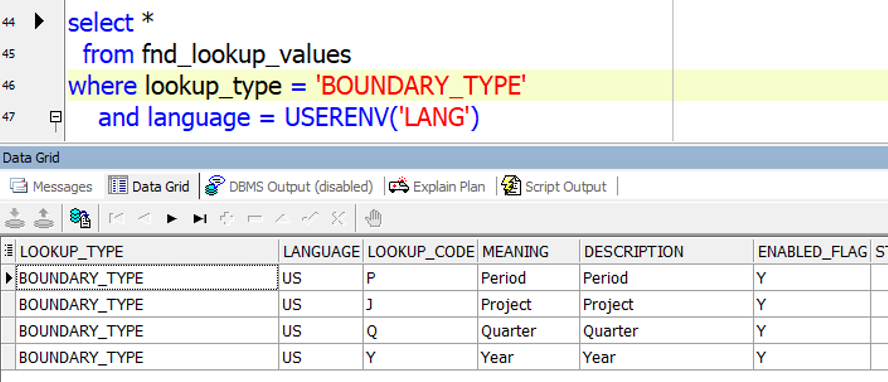
Budgetary Control Options in Oracle General Ledger(Lookups: FUNDS_CHECK_LEVEL,PTD_YTD and BOUNDARY_TYPE)
In Budgetory Control Options form we Funds Check Level, Amount Type, Boundary and Funding Budget.
We have Advisory, Absolute and None types of Funds Check Level.
Use Funds Check level when setting budgetary control options for account ranges, for source and category combinations in budgetary control groups, and for summary account templates.

 Amount Type is coming from Lookup Type "PTD_YTD". Below is the query we can use.


We have Advisory, Absolute and None types of Funds Check Level.
Use Funds Check level when setting budgetary control options for account ranges, for source and category combinations in budgetary control groups, and for summary account templates.
- Advisory: Use Advisory as Fund Check Level option for online notification when transactions fail funds checking. The system still reserves funds for transactions even when no funds are available.
- Absolute: Use Absolute as Fund Check Level option to prohibit you from reserving funds for a transaction unless funds are available.
- None: Use None as Fund Check Level option for no funds checking or funds reservation.

Funds Check Level is coming from Lookup Type "FUNDS_CHECK_LEVEL". Below is the query we can use.
 Amount Type is coming from Lookup Type "PTD_YTD". Below is the query we can use.
Boundary is coming from Lookup Type "BOUNDARY_TYPE". Below is the query we can use.
Thursday, January 30, 2020
FORMULA_RESULT_FLAG column in the PAY_RUN_RESULT_VALUES table
FORMULA_RESULT_FLAG column in the PAY_RUN_RESULT_VALUES table:-
D means Run
result calculated by the Fast Formula.
N means Run result created by a call to the API (Ex: PAY_RUN_RESULT_PKG).
NULL means Run result created as an indirect result or the input value directly entered by the user.
Monday, January 27, 2020
Move Order Status in Oracle Apps
select *
from fnd_lookup_values
where lookup_type = 'MTL_TXN_REQUEST_STATUS'
and language = USERENV('LANG')
order by lookup_code

from fnd_lookup_values
where lookup_type = 'MTL_TXN_REQUEST_STATUS'
and language = USERENV('LANG')
order by lookup_code

Friday, April 12, 2019
"PO: Allow Autocreation of Oracle Sourcing Documents" Profile Option in Oracle APPS
- Yes or No indicates whether the buyer can create Oracle Sourcing documents from the AutoCreate window.
- The default is No.
"PO: Allow Auto-generate Sourcing Rules" Profile in Oracle APPS
- Create Only indicates whether the buyer can create new sourcing rules, sourcing assignments, and approved supplier list entries while approving a blanket purchase agreement.
- Create and Update enables the buyer to update sourcing rules and assignments as well as create new sourcing rules.
- The default is None.
"MRP: Default Sourcing Assignment Set" Profile Option in Oracle Apps
- "MRP: Default Sourcing Assignment Set" profile option indicates which sourcing rules assignment set will be used in Purchasing and Supplier Scheduling.
- Planning allows the user to use multiple Assignment Sets, but Purchasing looks at only a single Assignment Set.
- The value of this profile option should be the name of the Assignment Set used in Purchasing.
- This profile option must be set if the user is using sourcing rules in Purchasing.
Wednesday, April 10, 2019
Query to identify the Customer Bank details in Oracle Apps R12
SELECT DISTINCT ac.customer_name, ac.customer_number
FROM iby_pmt_instr_uses_all instr_assign,
iby_external_payers_all payee,
iby_ext_bank_accounts bank_acct,
hz_cust_accounts_all hca,
ar_customers ac
WHERE instr_assign.instrument_id = bank_acct.ext_bank_account_id
AND instr_assign.ext_pmt_party_id = payee.ext_payer_id
AND instr_assign.instrument_type = 'BANKACCOUNT'
AND instr_assign.payment_flow = 'FUNDS_CAPTURE'
AND instr_assign.payment_function = 'CUSTOMER_PAYMENT'
AND hca.cust_account_id = payee.cust_account_id
AND ac.customer_number = hca.account_number
Monday, April 1, 2019
Query to get Print Lead Days in Oracle Lease and Finance Management(OLFM)
SELECT okl_stream_billing_pvt.get_printing_lead_days(:p_chr_id)
FROM dual
p_chr_id --> okc_k_headers_all_b.id
FROM dual
p_chr_id --> okc_k_headers_all_b.id
Subscribe to:
Posts (Atom)