Wednesday, August 31, 2022

How to remove spaces in RTF Based Excel Output in Oracle APPS(XML Publisher Report)

Standard Trial Balance report output is Text. So client wanted to convert this report output to Excel. After converting standard Trial Balance report to excel we found issue like amount columns having leading and trailing spaces.


With this user unable to do SUM and other mathematical calculations. 

To remove spaces use below xdo function.
<?xdoxslt:trim(DISP_BEGIN_BALANCE)?>

This will remove leading and trailing spaces in Excel Output File.

Monday, August 29, 2022

Query to get GL Account Description in Oracle APPS using GL_FLEXFIELDS _PKG

SELECT gcc.code_combination_id
  ,gcc.segment1
  ,apps.gl_flexfields_pkg.get_description_sql( gcc.chart_of_accounts_id,1,gcc.segment1) SEGMENT1_DESC
  ,gcc.segment2
  ,apps.gl_flexfields_pkg.get_description_sql( gcc.chart_of_accounts_id,2,gcc.segment2) SEGMENT2_DESC
  ,gcc.segment3
  ,apps.gl_flexfields_pkg.get_description_sql( gcc.chart_of_accounts_id,3,gcc.segment3) SEGMENT3_DESC
  ,gcc.segment4
  ,apps.gl_flexfields_pkg.get_description_sql( gcc.chart_of_accounts_id,4,gcc.segment4) SEGMENT4_DESC
  ,gcc.segment5
  ,apps.gl_flexfields_pkg.get_description_sql( gcc.chart_of_accounts_id,5,gcc.segment5) SEGMENT5_DESC
  ,gcc.segment6
  ,apps.gl_flexfields_pkg.get_description_sql( gcc.chart_of_accounts_id,6,gcc.segment6) SEGMENT6_DESC
FROM gl_code_combinations gcc
WHERE gcc.code_combination_id = 100000

Here gl_flexfields_pkg.get_description_sql has below parameters:
  1. Chart of Account ID
  2. Number of the Segment
  3. Segment value for which we need Description

Saturday, August 27, 2022

Dependent Values in DFF Enabled Fields in Oracle APPS

 We can use :$FLEX$.Previous_Value_Set_Name to get dependent Values in DFF Enabled Fields in Oracle APPS.


Thursday, August 25, 2022

Functional Setup Manager in Oracle Fusion

  • Functional Setup Manager is a web application that enables you to manage and perform functional configuration tasks for offerings. 
  • FSM is installed and deployed as part of OTBI Enterprise for HCM Cloud Service. 
  • FSM generates a list of configuration tasks specific to the offering and functional areas that were selected. These tasks can be assigned to different functional developers and the status of the implementation project can be monitored in FSM.
  • Functional Setup Manager user interfaces guide functional developers through the performance of each task. 

Configuration Manager in Oracle Fusion

  • Configuration Manager is a web application for setting up and maintaining an OTBI Enterprise for HCM Cloud Service environment. 
  • It also provides a quick review of setup values, and is the tool for monitoring and troubleshooting load plan executions. 
  • Configuration Manager works in conjunction with Functional Setup Manager to provide guided tasks to configure offerings and functional areas.
  • Using Configuration Manager, migrate configuration data across environments, using the import and export options.
  • Use Configuration Manager to Monitor and manage setup data also monitor and manage load plans.

Wednesday, August 24, 2022

Reconciled & Unreconciled Transactions Reports in Oracle Fusion

  • Reconciled Transactions Report provides details of clearing account journal lines that have been successfully reconciled by both automatic and manual reconciliation processes.
  • Unreconciled Transactions Report lists all unreconciled clearing account journal lines, specifically the unreconciled lines that weren't subjected to reconciliation yet, those lines rejected by previous automatic or manual reconciliation processes, and those lines that were marked as reviewed.

Journals Day Book Report in Oracle Fusion

  • This report provides posted journal entries and journal details chronologically by accounting date for a specified range of dates, journal source, and journal category.
  • Report sorts journal entries for each accounting date by document number.
  • It prints the accounting date, document number, journal entry name, journal source and category, subledger document name and number, currency, and conversion rate.
  • Report prints for each journal line, the line number, account segment value and description, functional debit and credit amounts, description, and cost center segment value.

Journals Details Report in Oracle Fusion

  • This report provides information about manually entered journals prior to posting, including field by field, all data entered into the applications or data imported from external sources.

Journals Batch Summary Report in Oracle Fusion

  • This report lists posted journal batches for a particular ledger, balancing segment value, currency, and date range. 
  • It provides information about actual balances for your journal batches, source, batch, and posting dates, total entered debits and credits. 
  • Report sorts the information by journal batch within each journal entry category.
  • This report includes totals for each journal category and a grand total for each ledger and balancing segment value combination.
  • It doesn't report on budget or encumbrance balances.

General Journals Report in Oracle Fusion

  • This report provides journal activity for a given period or range of periods, balancing segment value, currency, and range of account segment values.

Journals Report in Oracle Fusion

  • This report provides Journal activity for a given period or range of periods, balancing segment value, currency, and range of account segment values.
  • It also prints the accounting date, category, journal name, reference, journal batch name, entered debit or credit amounts, net balance, and account total for each journal.
  • Report includes a total for each balancing segment and a grand total for all the activity. 

Average Balance Audit Account Analysis Report in Oracle Fusion

  • This Report displays the detail account activity that created the aggregate balances and related average balances.
  • It displays daily Average Balance information for the selected accounts for the specified range of dates.
  • It contains parameters such as the As-Of reporting date, average balance type (period,quarter, or year average-to-date), and account ranges.

Account Analysis for Contra Account Report in Oracle Fusion

  • This report Prints balances by account segment and a secondary segment.
  • It lists the contra account for each journal entry and the subledger document number for transactions imported from subledgers.
  • It prints by date range, accounting Flex Field range, contra account, and amount range.

General Ledger Account Details Report in Oracle Fusion

  • Provides journal information to trace each transaction back to its original source.
  • Prints a separate page for each balancing segment value.
  • For each journal line it prints the account affected, the concatenated description, the journal line amount, and the beginning and ending account balance.
  • It also prints Journal details including source, category, journal name, and effective date.
  • Report lists accounts in ascending order by account segment value.
  • It prints a CR next to credit amounts

Account Analysis Report in Oracle Fusion General Ledger

  • Prints balances by account segment and a secondary segment for each journal entry.
  • Lists the subledger document number for transactions imported from subledgers. 

Monday, August 22, 2022

API to End Date FND_USER in Oracle APPS

DECLARE
    l_user_name       VARCHAR2(100)  := 'SYSADMIN';
    l_user_end_date   DATE  := SYSDATE+1;
BEGIN
fnd_user_pkg.updateuser(x_user_name               => l_user_name
                           ,x_owner                   => NULL
                           ,x_unencrypted_password    => NULL
                           ,x_start_date              => NULL
                           ,x_end_date                => l_user_end_date
                           ,x_password_date           => NULL
                           ,x_password_lifespan_days  => NULL
                           ,x_employee_id             => NULL
                           ,x_email_address           => NULL
);

 COMMIT;
EXCEPTION
  WHEN OTHERS THEN
    ROLLBACK;
    DBMS_OUTPUT.PUT_LINE(SQLERRM);
END;

Thursday, July 28, 2022

Query to get Supplier Site Details(Payment Method, Term) details in Oracle APPS

SELECT assa.vendor_id
      ,asa.vendor_name 
      ,assa.vendor_site_code
      ,asa.segment1 vendor_number
      ,assa.vendor_site_id
      ,assa.address_line1
      ,assa.address_line2
      ,assa.city
      ,assa.state
      ,assa.zip postal_code
      ,assa.country
      ,asa.vat_registration_num
      ,asa.vendor_type_lookup_code vendor_type
      ,decode(nvl(assa.hold_unmatched_invoices_flag, 'N'), 'Y', 'PO', 'NONPO') invoice_type
      ,asa.invoice_currency_code currency_code
      ,assa.org_id
      ,hou.name operating_unit
      ,assa.vendor_site_code 
      ,gcc.segment1 || '.' || gcc.segment2 || '.' || gcc.segment3 || '.' || gcc.segment4 || '.' || gcc.segment5 || '.' || gcc.segment6 liability_account
      ,apt.name term_name
      ,ipmb.payment_method_code
  FROM fnd_lookup_values       lv
      ,iby_payment_methods_b   ipmb
      ,iby_ext_party_pmt_mthds epm
      ,hr_organization_units   hou
      ,iby_external_payees_all iepa
      ,ap_terms                apt
      ,gl_code_combinations    gcc
      ,ap_supplier_sites_all   assa
      ,ap_suppliers            asa
 WHERE lv.attribute2(+) = 'Y'
   AND lv.lookup_code(+) = assa.pay_group_lookup_code
   AND ipmb.payment_method_code(+) = epm.payment_method_code
   AND NVL(epm.primary_flag, 'Y') = 'Y' -- this is the current/active version.  when you make a change, object_version_number changes and old record primary_flag will change to N
   AND iepa.supplier_site_id = assa.vendor_site_id
   AND epm.ext_pmt_party_id (+) = iepa.ext_payee_id
   AND iepa.payee_party_id = asa.party_id
   AND apt.term_id = assa.terms_id
   AND gcc.code_combination_id = assa.accts_pay_code_combination_id
   AND assa.vendor_id = asa.vendor_id
   AND assa.org_id = hou.organization_id
   -- Supplier and Site Validations
   AND nvl(assa.inactive_date, SYSDATE + 1) >= TRUNC(SYSDATE)  -- site must be active
   AND nvl(asa.end_date_active, SYSDATE + 1) >= TRUNC(SYSDATE) -- supplier must be active
   AND asa.vendor_type_lookup_code = 'VENDOR'

Query to get Element Advance Salary in Oracle APPS HRMS

SELECT papf.employee_number
      ,prrv.result_value
  FROM pay_run_results prr
  ,pay_element_types_f petf
  ,pay_run_result_values prrv
  ,pay_input_values_f piv
  ,pay_assignment_actions paa
  ,pay_payroll_actions ppa
  ,per_all_assignments_f paaf
  ,per_all_people_f papf
 WHERE prr.element_type_id = petf.element_type_id
   AND prr.run_result_id = prrv.run_result_id
   AND prrv.input_value_id = piv.input_value_id
   AND prr.assignment_action_id = paa.assignment_action_id
   AND paaf.assignment_id = paa.assignment_id
   AND paaf.business_group_id = fnd_profile.value('PER_BUSINESS_GROUP_ID')
   and paaf.person_id= papf.person_id
   AND papf.business_group_id = fnd_profile.value('PER_BUSINESS_GROUP_ID')
   AND upper(petf.element_name) = 'ADVANCE SALARY'
   AND piv.name = 'Pay Value' 
   AND SYSDATE BETWEEN piv.effective_start_date AND  piv.effective_end_date
   AND SYSDATE BETWEEN petf.effective_start_date AND  petf.effective_end_date
   AND SYSDATE BETWEEN paaf.effective_start_date AND  paaf.effective_end_date
   AND SYSDATE BETWEEN papf.effective_start_date AND papf.effective_end_date
   AND ppa.payroll_action_id = paa.payroll_action_id                         
   AND ppa.action_type IN ('Q', 'R')
   AND ppa.effective_date = '31-JUL-2022'
   AND prrv.result_value > '0'

Friday, July 22, 2022

AP_INVOICE_LINES_ALL.LINE_SOURCE in Oracle APPS

LINE_SOURCE --> Source of the invoice line. Validated against AP_LOOKUP_CODES.LOOKUP_CODE for LOOKUP_TYPE as LINE SOURCE
 
SELECT *
  FROM ap_lookup_codes
 WHERE lookup_type = 'LINE SOURCE'

AP_INVOICE_LINES_ALL.LINE_TYPE_LOOKUP_CODE(INVOICE LINE TYPE) in Oracle APPS

LINE_TYPE_LOOKUP_CODE --> Type of invoice line. Possible values for this column are derived from FND_LOOKUP_VALUES for lookup_type 'INVOICE LINE TYPE'.
 
SELECT *
  FROM fnd_lookup_values
 WHERE lookup_type = 'INVOICE LINE TYPE'
    AND language = USERENV('LANG')

Sunday, July 10, 2022

Balance Type (Year to Date, Project to Date, Period to Date and Quarter to Date)in Oracle General Ledger

SELECT lookup_code, meaning, description, REPLACE(description, '-', ' ') balance_type
  FROM fnd_lookup_values
 WHERE 1 = 1 
    AND lookup_type = 'PTD_YTD'
    AND language = USERENV('LANG')


Thursday, July 7, 2022

API to get the Segment Delimiter for the specified (KFF)Key Flex Field Structure using FND_FLEX_EXT.GET_DELIMITER in Oracle APPS

DECLARE
  l_application_short_name VARCHAR2(50);--fnd_application.application_short_name
  l_key_flex_code          VARCHAR2(200);
  l_structure_number       NUMBER; -- gl_ledgers.chart_of_accounts_id
  l_segment_delimiter      VARCHAR2(10);
BEGIN
l_application_short_name := 'SQLGL';
l_key_flex_code          := 'GL#';
l_structure_number       := 51234;

l_segment_delimiter := fnd_flex_ext.get_delimiter
                    (
                      application_short_name => l_application_short_name
                     ,key_flex_code          => l_key_flex_code
                     ,structure_number       => l_structure_number
                    ); 

DBMS_OUTPUT.PUT_LINE('l_segment_delimiter = ' || l_segment_delimiter);
END;

Tuesday, July 5, 2022

Set Oracle Report(rdf) Concurrent Program ends with Warning Status

Create a user parameter as P_CONC_REQUEST_ID as shown in below screenshot.


In before report trigger initialize using user exists as shown in below screenshot.


Below is our requirement:

We have two optional parameters Account and Parent Account. User has to select either of the one parameter. If user selects both Parameters then the report output will be blank. So we are completing program with Warning status so that user can go review the log file.


As shown in above screenshot write srw.message to see the message in log file.


Sunday, July 3, 2022

Query to get Legal Entity Name in Oracle Apps

SELECT hou.name operating_unit_name
      ,xep.name legal_entity_name
  FROM hr_operating_units hou
      ,xle_entity_profiles xep
 WHERE hou.default_legal_context_id = xep.legal_entity_id

Friday, July 1, 2022

AP_SUPPLIER_SITES_ALL.PAY_GROUP_LOOKUP_CODE or PO_VENDOR_SITES_ALL.PAY_GROUP_LOOKUP_CODE in Oracle APPS

SELECT *
  FROM apps.fnd_lookup_values flv
 WHERE     flv.lookup_type = 'PAY GROUP'
       AND flv.LANGUAGE = USERENV ('LANG')
       AND flv.enabled_flag = 'Y'
       AND SYSDATE BETWEEN NVL (flv.START_DATE_ACTIVE, SYSDATE)
                       AND NVL (flv.END_DATE_ACTIVE, SYSDATE)

LOOKUP_CODE will be AP_SUPPLIER_SITES_ALL.PAY_GROUP_LOOKUP_CODE or PO_VENDOR_SITES_ALL.PAY_GROUP_LOOKUP_CODE

Thursday, June 30, 2022

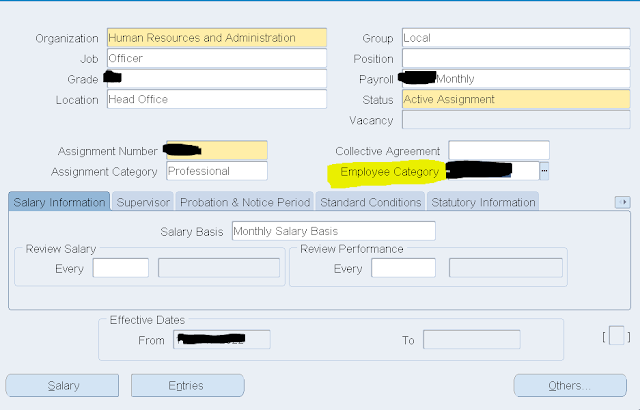
Employee Category(PER_ALL_ASSIGNMENTS_F.EMPLOYMENT_CATEGORY) in Employee Assignment Form in Oracle APPS

PER_ALL_ASSIGNMENTS_F.EMPLOYMENT_CATEGORY values coming from HR_LOOKUPS.LOOKUP_TYPE = 'EMP_CAT'

SELECT * FROM HR_LOOKUPS WHERE LOOKUP_TYPE = 'EMP_CAT' AND enabled_flag = 'Y' AND SYSDATE BETWEEN NVL (start_date_active, SYSDATE) AND NVL (end_date_active, SYSDATE)


Revenue Analyst in Oracle Fusion


Revenue Analyst manages and implements revenue adjustments, revenue recognition, revenue accounting, creation and processing of revenue documents, and the inquiry of revenue documents and adjustments. 
It also manages the defining of open and closed periods and transferring entries to the GL(General Ledger).

Accounts Receivable Specialist in Oracle Fusion

Accounts Receivable Specialist manages and implements all customer related payment activities, including receiving customer payments and electronic remittance advice, performing cash handling activities, processing customer payments, and applying payments to customer accounts.

Accounts Receivable Manager in Oracle Fusion

Account Receivable Manager manages all accounts receivable activities. It also includes below activities:

  • Defining policy and controls
  • Establishing processes and procedures, resolving issues
  • Monitoring and analyzing accounts receivable balances 
  • Creating reports 
  • Business Intelligence.

Query to get Next Month First Day for a given Date in Oracle

SELECT TRUNC (ADD_MONTHS (SYSDATE, 1), 'MON'), TO_CHAR (TRUNC (ADD_MONTHS (SYSDATE, 1), 'MON'), 'DD-MON-RRRR')  FROM DUAL


Monday, June 27, 2022

Assets by Cash Generating Unit Report in Oracle Fusion

Oracle Fusion Assets provides predefined reports that are used in the close process and to verify asset transactions. The Assets reports run from the Scheduled Processes work area found on the Navigator.

Assets by Cash Generating Unit Report:

  • Lists all assets by cash generating unit. 
  • The report extracts the details of all of the asset impairment transactions, such as asset number, cash generating unit, cost, net book value, accumulated impairment reserve, and year-to-date impairments from Oracle Fusion Assets.

Hypothetical Depreciation Analysis Report in Oracle Fusion

Oracle Fusion Assets provides predefined reports that are used in the close process and to verify asset transactions. The Assets reports run from the Scheduled Processes work area found on the Navigator.

Hypothetical Depreciation Analysis Report:

  • Lists depreciation projections for hypothetical assets based on the specified depreciation parameters.

Property Tax Report in Oracle Fusion

Oracle Fusion Assets provides predefined reports that are used in the close process and to verify asset transactions. The Assets reports run from the Scheduled Processes work area found on the Navigator.

Property Tax Report:

  • Lists the assets at a particular location as of the specified cutoff date. 
  • This information is used for property tax forms. 
  • The report is sorted by and groups totals for each balancing segment, location, asset account, and year acquired.

Revaluation Reserve Summary Report in Oracle Fusion

Oracle Fusion Assets provides predefined reports that are used in the close process and to verify asset transactions. The Assets reports run from the Scheduled Processes work area found on the Navigator.

Revaluation Reserve Summary Report; 
  • Lists asset level revaluation reserve account balances for the specified periods. 
  • The report is sorted by and groups totals for each balancing segment, reserve account, and cost center.

Revaluation Reserve Detail Report in Oracle Fusion

Oracle Fusion Assets provides predefined reports that are used in the close process and to verify asset transactions. The Assets reports run from the Scheduled Processes work area found on the Navigator.

Revaluation Reserve Detail Report:
  • Lists asset revaluation reserve account balances for a specified period for an asset level. 
  • The report is sorted by and groups totals for each balancing segment, asset cost account, and cost center.

Reserve Summary in Oracle Fusion

Oracle Fusion Assets provides predefined reports that are used in the close process and to verify asset transactions. The Assets reports run from the Scheduled Processes work area found on the Navigator.

Reserve Summary Report:
  • Lists reserve account summary balances for the specified periods. 
  • The report is sorted by and groups totals for each balancing segment and reserve account.

Reserve Detail Report in Oracle Fusion

Oracle Fusion Assets provides predefined reports that are used in the close process and to verify asset transactions. The Assets reports run from the Scheduled Processes work area found on the Navigator.

Reserve Detail Report:
  • Lists asset level asset reserve account balances for the specified periods. 
  • The report is sorted by and groups totals for each balancing segment, reserve account, and cost center.

CIP Summary Report in Oracle Fusion

Oracle Fusion Assets provides predefined reports that are used in the close process and to verify asset transactions. The Assets reports run from the Scheduled Processes work area found on the Navigator.

CIP Summary Report: 

  • Lists CIP cost account summary balances for the specified periods. 
  • The report is sorted by and groups totals for each balancing segment and CIP cost account.

CIP Detail Report in Oracle Fusion

Oracle Fusion Assets provides predefined reports that are used in the close process and to verify asset transactions. The Assets reports run from the Scheduled Processes work area found on the Navigator.

CIP Detail Report:

  • Lists asset-level construction-in-process (CIP) cost account balances for the specified periods.
  • The report is sorted by and groups totals for each balancing segment, CIP cost account, and cost center.

Journal Entry Reserve Ledger in Oracle Fusion

Oracle Fusion Assets provides predefined reports that are used in the close process and to verify asset transactions. The Assets reports run from the Scheduled Processes work area found on the Navigator.

Journal Entry Reserve Ledger:

  • Lists asset depreciation amounts for the specified period. 
  • The report is sorted by and groups totals for each balancing segment, expense account, reserve account, and cost center.

Cost Summary Report in Oracle Fusion

Oracle Fusion Assets provides predefined reports that are used in the close process and to verify asset transactions. The Assets reports run from the Scheduled Processes work area found on the Navigator.

Cost Summary Report:
  • Lists asset cost account summary balances for the specified periods. 
  • The report is sorted by and groups totals for each balancing segment and asset cost account.

Cost Detail Report in Oracle Fusion

Oracle Fusion Assets provides predefined reports that are used in the close process and to verify asset transactions. The Assets reports run from the Scheduled Processes work area found on the Navigator.

Cost Detail Report:
  • Lists asset-level asset cost account balances for the specified periods. 
  • The report is sorted by and groups totals for each balancing segment, asset cost account, and cost 
  •  center.

Cost Clearing Reconciliation in Oracle Fusion

Oracle Fusion Assets provides predefined reports that are used in the close process and to verify asset transactions. The Assets reports run from the Scheduled Processes work area found on the Navigator.

Cost Clearing Reconciliation: 

  • Report Lists all asset additions and cost adjustments performed during the specified period for which accounting entries are created for cost clearing accounts. 
  • The report is sorted by and groups totals for each transaction type, balancing segment, and clearing account.

Sunday, June 26, 2022

Post Mass Additions Report in Oracle Fusion

Oracle Fusion Assets provides predefined reports that are used in the close process and to verify asset transactions. The Assets reports run from the Scheduled Processes work area found on the Navigator.

Post Mass Additions Report
  • Lists all the asset additions and cost adjustments processed by the Post Mass Additions process.
  • The report is sorted by transaction type.

Delete Mass Additions Report in Oracle Fusion

Oracle Fusion Assets provides predefined reports that are used in the close process and to verify asset transactions. The Assets reports run from the Scheduled Processes work area found on the Navigator.

Delete Mass Additions Report:
  • Lists all the mass addition lines in the Delete queue that are ready to be processed by the Delete Mass Additions process.

Create Mass Additions Report in Oracle Fusion

Oracle Fusion Assets provides predefined reports that are used in the close process and to verify asset transactions. The Assets reports run from the Scheduled Processes work area found on the Navigator.

Create Mass Additions Report: 
  • Lists all invoice and discount lines processed by the Create Mass Additions process. 
  • The report is sorted by and groups totals for each foreign currency, balancing segment, asset clearing account, and cost center.
  • This report is usually run from Payables.

Asset Impairment Report in Oracle Fusion

Oracle Fusion Assets provides predefined reports that are used in the close process and to verify asset transactions. The Assets reports run from the Scheduled Processes work area found on the Navigator.

Asset Impairment Report: 

  • Lists the impact of impairment transactions. 
  • Displays the cost, new net book value, net selling price, value in use, and impairment loss amount for  all of the impaired assets in the given book and depreciation period. 
  • The report is sorted by the asset number.
  • The report shows totals for the current net book value, net selling price, values in use, impairment loss, and new net book value.


Asset Category Change Report in Oracle Fusion

Oracle Fusion Assets provides predefined reports that are used in the close process and to verify asset transactions. The Assets reports run from the Scheduled Processes work area found on the Navigator.

Asset Category Change Report: 
  • Lists all of the assets for which the asset category is changed during the specified period. 
  • The report is sorted by and groups totals for each balancing segment, asset account, and asset number.

Cost Adjustments by Source Report in Oracle Fusion

Oracle Fusion Assets provides predefined reports that are used in the close process and to verify asset transactions. The Assets reports run from the Scheduled Processes work area found on the Navigator.

Cost Adjustments by Source Report:

  • Lists all the asset cost adjustments made during the specified periods. 
  • The report shows the details of associated invoice lines. 
  • The report sorts and totals by source, balancing segment, asset type, asset account, cost center, and asset number.

Cost Adjustment Report in Oracle Fusion

Oracle Fusion Assets provides predefined reports that are used in the close process and to verify asset transactions. The Assets reports run from the Scheduled Processes work area found on the Navigator.

Cost Adjustment Report:
  • Lists all of the asset cost adjustments made during the specified periods. 
  • The report is sorted by and groups totals for each balancing segment, asset type, asset cost account, and cost center.

APEX$TASK_PK

  APEX$TASK_PK is a substitution string holding the primary key value of the system of records