|
SL_NO |
11i
TABLES
|
R12 TABLES |
|
1 |
GL_ACCOUNT_HIERARCHIES |
GL_ACCOUNT_HIERARCHIES |
|
2 |
GL_AHE_DETAIL_RANGES_GT |
GL_AHE_DETAIL_RANGES_GT |
|
3 |
GL_ALLOC_BATCHES |
GL_ALLOC_BATCHES |
|
4 |
GL_ALLOC_FORMULA_LINES |
GL_ALLOC_FORMULA_LINES |
|
5 |
GL_ALLOC_FORMULAS |
GL_ALLOC_FORMULAS |
|
6 |
GL_ALLOC_HISTORY |
GL_ALLOC_HISTORY |
|
7 |
GL_ALLOC_SEGVALS_INT |
|
|
8 |
GL_APPLICATION_GROUPS |
|
|
9 |
GL_ARCHIVE_HISTORY |
GL_ARCHIVE_HISTORY |
|
10 |
GL_AUTHORIZATION_LIMITS |
GL_AUTHORIZATION_LIMITS |
|
11 |
GL_AUTO_ALLOC_BAT_HIST_DET |
GL_AUTO_ALLOC_BAT_HIST_DET |
|
12 |
GL_AUTO_ALLOC_BATCH_HISTORY |
GL_AUTO_ALLOC_BATCH_HISTORY |
|
13 |
GL_AUTO_ALLOC_BATCHES |
GL_AUTO_ALLOC_BATCHES |
|
14 |
GL_AUTO_ALLOC_REV_BATCHES |
GL_AUTO_ALLOC_REV_BATCHES |
|
15 |
GL_AUTO_ALLOC_SET_HISTORY |
GL_AUTO_ALLOC_SET_HISTORY |
|
16 |
GL_AUTO_ALLOC_SETS |
GL_AUTO_ALLOC_SETS |
|
17 |
GL_AUTOMATIC_POSTING_OPTIONS |
GL_AUTOMATIC_POSTING_OPTIONS |
|
18 |
GL_AUTOMATIC_POSTING_SETS |
GL_AUTOMATIC_POSTING_SETS |
|
19 |
GL_AUTOREVERSE_OPTIONS |
GL_AUTOREVERSE_OPTIONS |
|
20 |
GL_BALANCES |
GL_BALANCES |
|
21 |
GL_BALANCES_DELTA |
GL_BALANCES_DELTA |
|
22 |
GL_BALANCES_DELTA_INTERIM |
GL_BALANCES_DELTA_INTERIM |
|
23 |
GL_BC_DUAL |
GL_BC_DUAL |
|
24 |
GL_BC_DUAL2 |
GL_BC_DUAL2 |
|
25 |
GL_BC_EVENT_TIMESTAMPS |
GL_BC_EVENT_TIMESTAMPS |
|
26 |
GL_BC_OPTION_DETAILS |
GL_BC_OPTION_DETAILS |
|
27 |
GL_BC_OPTIONS |
GL_BC_OPTIONS |
|
28 |
GL_BC_PACKET_ARRIVAL_ORDER |
GL_BC_PACKET_ARRIVAL_ORDER |
|
29 |
GL_BC_PACKETS |
GL_BC_PACKETS |
|
30 |
GL_BC_PERIOD_MAP |
GL_BC_PERIOD_MAP |
|
31 |
GL_BIS_SEGVAL_INT |
GL_BIS_SEGVAL_INT |
|
32 |
GL_BUDGET_ASSIGNMENT_RANGES |
GL_BUDGET_ASSIGNMENT_RANGES |
|
33 |
GL_BUDGET_ASSIGNMENTS |
GL_BUDGET_ASSIGNMENTS |
|
34 |
GL_BUDGET_BATCHES |
GL_BUDGET_BATCHES |
|
35 |
GL_BUDGET_ENTITIES |
GL_BUDGET_ENTITIES |
|
36 |
GL_BUDGET_FROZEN_RANGES |
GL_BUDGET_FROZEN_RANGES |
|
37 |
GL_BUDGET_INTERFACE |
GL_BUDGET_INTERFACE |
|
38 |
GL_BUDGET_INTERIM |
GL_BUDGET_INTERIM |
|
39 |
GL_BUDGET_PERIOD_RANGES |
GL_BUDGET_PERIOD_RANGES |
|
40 |
GL_BUDGET_RANGE_INTERIM |
GL_BUDGET_RANGE_INTERIM |
|
41 |
GL_BUDGET_TYPES |
GL_BUDGET_TYPES |
|
42 |
GL_BUDGET_VERSIONS |
GL_BUDGET_VERSIONS |
|
43 |
GL_BUDGETS |
GL_BUDGETS |
|
44 |
GL_CARRYFORWARD_RANGES |
GL_CARRYFORWARD_RANGES |
|
45 |
GL_CODE_COMBINATIONS |
GL_CODE_COMBINATIONS |
|
46 |
GL_CONCURRENCY_CONTROL |
GL_CONCURRENCY_CONTROL |
|
47 |
GL_CONCURRENT_SCHEDULES |
GL_CONCURRENT_SCHEDULES |
|
48 |
GL_CONS_BATCHES |
GL_CONS_BATCHES |
|
49 |
GL_CONS_FLEX_HIERARCHIES |
GL_CONS_FLEX_HIERARCHIES |
|
50 |
GL_CONS_FLEXFIELD_MAP |
GL_CONS_FLEXFIELD_MAP |
Tuesday, November 30, 2021
GL Table Changes R12 in Oracle APPS

What are the possible reasons for Interface Trip Stop to complete with Error in Oracle APPS?
Below are the few possible reasons for Interface Trip Stop completes with Error:
- Order is on Hold
- Tax is not applied properly
- On-Hand quantity is not available in the Inventory
- Inventory Period is not open
- Make sure Schedule Ship Date or Requested Date is within the range of order Date
What is Interface Trip Stop in Order Management in Oracle APPS?
Interface Trip Stop is triggered at the time of shipping if the option ‘Defer Interface’ is not checked. When this report is run, it performs two main things:
- Update the order management (OE_ORDER_LINES_ALL)
- Trigger the inventory interface (TO UPDATE Inventory tables)
What is Bill of Lading in Order Management in Oracle APPS?
- Bill of Lading is a legal document between the shipper of a particular item and the carrier detailing the type, quantity and destination of the good being carried.
- The bill of lading also serves as a receipt of shipment when the good is delivered to the predetermined destination.
- This document must accompany the shipped goods, no matter the form of transportation, and must be signed by an authorized representative from the carrier, shipper and receiver.
What is Pick Slip and Packing Slip in Order Management in Oracle APPS?
Pick Slip: It is a shipping document that the pickers use to locate items in the warehouse/inventory to ship for an order.
Packing Slip: It is a shipping document that is sent along with the shipment which details the contents that are sent in that shipment.
What are Defaulting Rules in Order Management in Oracle APPS?
When creating the sales order, you can define defaulting rules so that the default values of the fields populate automatically instead of typing all information manually.
What is Shipping Exceptions Report in Oracle APPS?
Shipping Exceptions report prints the Exception Messages during Ship Confirmation.
What are Picking Rules in Order Management in Oracle APPS?
- A user-defined set of criteria to define the priorities, Oracle Order Management uses when picking items out of finished goods from inventory to ship to a customer.
- Picking rules are defined in Oracle Inventory.
At what stage an Order cannot be cancelled?
Sales Order cannot be cancelled once it is Pick Confirmed.

What are the different RMA Order Types in Oracle APPS?
- RMA with Credit is used when the customer returns the physical product and also receives credit as a result of the return.
- RMA no Credit is used when the customer will return the product but will not be receiving a credit as a result of the return.
- RMA Credit only is used when the customer will receive a credit, but the physical return of the product is not required.

Describe the Order Flow in Order to Cash life cycle in Oracle APPS
- Enter the Sales Order
- Book the Sales Order
- Pick Release
- Ship Confirm
- Auto Invoice Generation
- Creating Receipt
- Transfer to GL
What are the various Order Management Processes in Oracle APPS Order Management
- Standard Orders: This method supports Make to Stock business model where the products are made and kept in stock. The products are then shipped to the customer based on his order.
- Configure to Orders: This method supports Assemble to Order business model. The product configuration is chosen at the time of sales order entry. WIP job is created based on the requirement of the sales order.
- Drop Ship Orders: In Drop Ship Method, your supplier will ship the goods to your customer on your behalf.
- Internal Sales Orders: Internal Sales Orders are created across two different organizations of the same Business group. Internal requisition is raised first and it is converted to an internal sales order where the items are shipped based on the quantity specified in the internal sales order.
Friday, November 26, 2021
API to delete Purchase Orders in Oracle APPS
Query to get PO With Approval , Invoice and Payment Details in Oracle APPS
AP_INVOICE_DISTRIBUTIONS_ALL.MATCH_STATUS_FLAG in Oracle APPS

- Validated: If all of the invoice distributions have a MATCH_STATUS_FLAG = 'A'
- Never Validated: If all of the invoice distributions have a MATCH_STATUS_FLAG = null or 'N'
- Needs Revalidation:
- If there are any rows in AP_HOLDS that do not have a release code.
- If any of the invoice distributions have a MATCH_STATUS_FLAG = 'T'.
- If the invoice distributions have MATCH_STATUS_FLAG values = 'N', null and 'A'.
PO_HEADERS_ALL.APPROVED_FLAG in Oracle APPS
Query to get all Purchase Requisition without a Purchase Order in Oracle APPS
Query to get Cancelled Requisitions in Oracle APPS
OE_ORDER_LINES_ALL.source_document_type_id in Oracle APPS
Here order_source_id will be source_document_type_id in OE_ORDER_LINES_ALL table.
Query to get all Internal Requisitions that do not have an associated Internal Sales Order
Thursday, November 25, 2021
PO_HEADERS_ALL.TYPE_LOOKUP_CODE in Oracle APPS
PO_LINE_LOCATIONS_ALL.MATCH_OPTION in Oracle APPS
Query to extract Open PO's in Oracle APPS
Tuesday, November 23, 2021
Query to Extract Open AP Invoice Lines in Oracle APPS
Query to Extract Open AP Invoices in Oracle APPS
Wednesday, November 10, 2021
Query to get User Roles in Oracle APPS
Friday, November 5, 2021
API to update Supplier Site Payment Method Lookup Code in Oracle APPS - iby_disbursement_setup_pub.update_external_payee
- Use iby_disbursement_setup_pub.update_external_payee API to update Supplier Site Payment Method.
- This API will not update ap_supplier_sites_all.payment_method_lookup_code column.
- Supplier Site payment method details are stored in iby_ext_party_pmt_mthds table.
- AP_VENDOR_PUB_PKG.Update_Vendor_Site do not use for Supplier Site Payment Method Update.
- Parameter Exclusive Payment flag(exclusive_pay_flag) is required.
Query to get Invoice Payment Voucher Details in Oracle APPS
Thursday, November 4, 2021
Query to get Concurrent Programs that are Errored or Warning in Oracle APPS
Difference between Cursor and Ref Cursor in Oracle APPS
- A normal PL/SQL cursor is static in definition. Ref cursors may be dynamically opened based on some logic.
- A cursor cannot be returned to a client. A Ref cursor can be returned to a client.
- A cursor can be Global. A ref cursor cannot be Global.
- A ref cursor can be passed from subroutine to subroutine. A cursor cannot be passed from subroutine.
- Static SQL i.e. not using a Ref cursor is much more efficient then using ref cursors.
Tuesday, November 2, 2021
Sample API Script for Creating Employee Dependent Contact Details in Oracle HRMS(APPS)
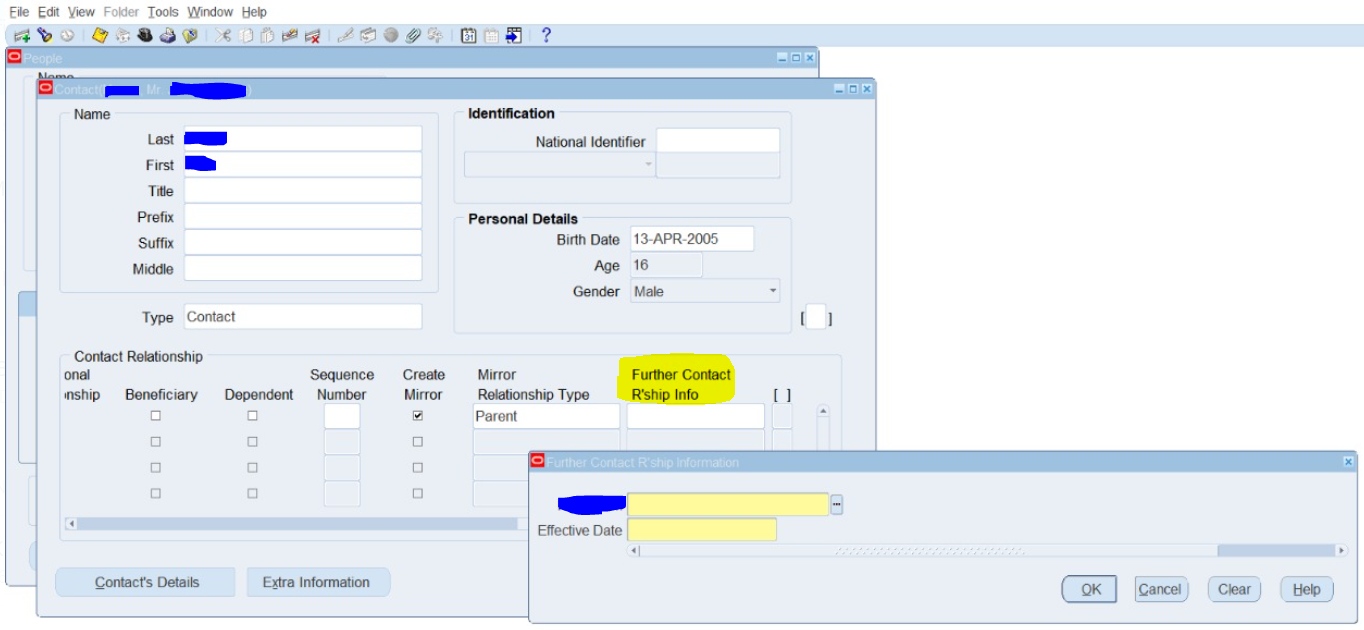
ORA-20001: FLEX-NULL REQUIRED SEGMENT: N, SEGMENT_NAME, 'XX_SEGMENT_NAME' while creating Employee Contact hr_contact_rel_api.create_contact
While creating relationship type contact for employee using hr_contact_rel_api.create_contact API, getting "ORA-20001: FLEX-NULL REQUIRED SEGMENT: N, SEGMENT_NAME, 'XX_SEGMENT_NAME'" error. When you face such error please validate "Further Contact R'ship Info" flex field has any mandatory values as shown in below screenshot.